Showing posts with label oracle jdeveloper. Show all posts

Thursday, September 6

Using Oracle EM 11g FMC and ADR 11.1.1.6.0 with JDev 11.1.2.2.0


Goal

Using Oracle EM 11g FMC and ADR 11.1.1.6.0 with JDeveloper 11.1.2.2.0 - Software


Environment

OL 6.2
JDeveloper 11.1.2.2.0 - Software


Software

OTN: ADR libraries 11.1.1.6.0 (Application Development Runtime)


Patches

MOS: 5912518 - OPatch v11.1.0.0.1
MOS: 13656274
MOS: 6880880 - OPatch  v11.1.0.9.7 
MOS: 13656372


References

MOS: How To Install the ADF Runtime Libraries 11g Release 2 in WebLogic Sever 10.3.5 / 10.3.6 ? [ID 1328698.1]


Install ADR 11.1.1.6.0

[oracle@endvm software]$ unzip ofm_appdev_generic_11.1.1.6.0_disk1_1of1.zip 
:
[oracle@endvm software]$ cd Disk1/
[oracle@endvm ~]$ export JDK_HOME=/usr/jdk1.6.0_33


[oracle@endvm Disk1]$ ./runInstaller 
:
Set Oracle Middleware Home =  /u01/app/oracle/product/11.1.2/middleware inside OUI.


Install OPatch Version 11.1.0.0.1

a) For Standalone JDeveloper/Standalone WLS install type:
   Download the latest version of OPatch(11.1.0.0.0)via BUG 5912518 from My
   Oracle Support (formerly Metalink).
 
   Patch: p5912518_111000_GENERIC.zip
   Please follow the instructions to install this patch.
 
b) For OUI (WebCenter/SOA/Classic/etc) install type:
   Download the latest version of OPatch (11.1.0.9.4 or higher)via BUG 6880880
   from My Oracle Support (formerly Metalink).

[oracle@endvm software]$ export JDEV_HOME=/u01/app/oracle/product/11.1.2/middleware/jdeveloper/
[oracle@endvm ~]$ export JDK_HOME=/usr/jdk1.6.0_33
[oracle@endvm software]$ unzip p5912518_111000_GENERIC.zip
[oracle@endvm software]$ mv 5912518/OPatch/ $JDEV_HOME/
[oracle@endvm ~]$ export ORACLE_HOME=$JDEV_HOME
[oracle@endvm ~]$ cd $ORACLE_HOME/OPatch

[oracle@endvm OPatch]$ ./opatch lsinventory -jdk $JDK_HOME


Install Patch 13656274

[oracle@endvm jdeveloper]$ cd /home/oracle/software
[oracle@endvm software]$ unzip p13656274_111160_Generic.zip
[oracle@endvm software]$ cd 13656274
[oracle@endvm 13656274]$ export PATH=$ORACLE_HOME/OPatch:$PATH
[oracle@endvm 13656274]$ export ORACLE_HOME=/u01/app/oracle/product/11.1.2/middleware/oracle_common


Install OPatch Version 11.1.0.9.0 (6880880)

Patch 13656372 requires OPatch version 11.1.0.9.0.
The OPatch version being used (11.1.0.0.1) doesn't meet the minimum version required by the patch(es). Please download latest OPatch from My Oracle Support.
[oracle@endvm software]$ rm -rf /u01/app/oracle/product/11.1.2/middleware/jdeveloper/OPatch/
[oracle@endvm software]$ unzip p6880880_111000_Linux-x86-64.zip
[oracle@endvm software]$ mv 6880880/OPatch/ $JDEV_HOME/


Install Patch 13656372

[oracle@endvm software]$ unzip p13656372_111160_Generic.zip[oracle@endvm 13656372]$ cd ..[oracle@endvm software]$ cd 13656372/[oracle@endvm 13656372]$ opatch apply -jdk $JDK_HOME


upgradeADF

[oracle@endvm bin]$ cd /u01/app/oracle/product/11.1.2/middleware/oracle_common/common/bin
[oracle@endvm bin]$ ./wlst.sh

wls:/offline> upgradeADF('/u01/app/oracle/product/11.1.2/middleware/user_projects/domains/test.adf.domain')Target Library "jsf#2.0@1.0.0.0_2-0-2" to JRF "AdminServer"wls:/offline>exit()

Exiting WebLogic Scripting Tool.

Exception: java.lang.ClassNotFoundException: javax.faces.application.ProjectStage

<06 .09.2012=".09.2012" 18:32="18:32" mesz="mesz" uhr="uhr">
java.lang.ClassNotFoundException: javax.faces.application.ProjectStage


Solution

You have not upgrade the Domain !


Test


Monday, September 3

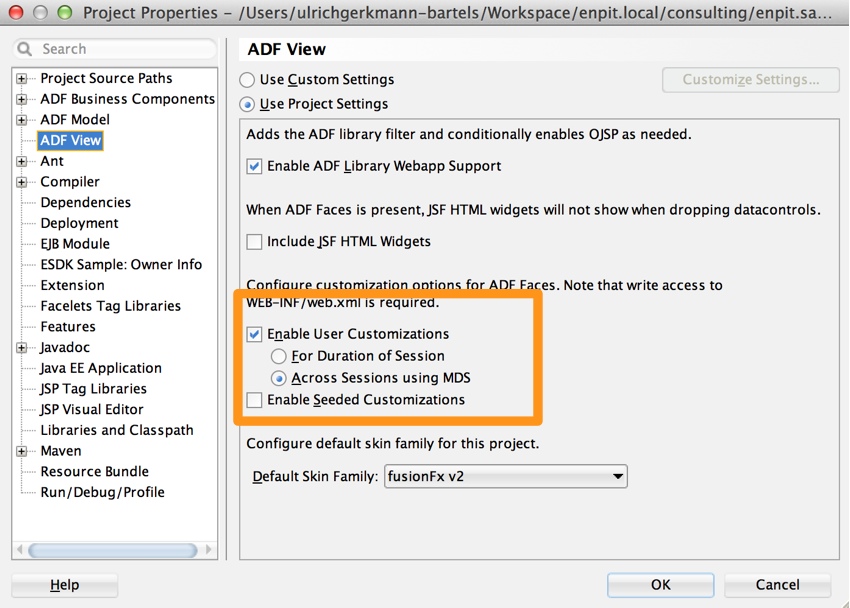
[Solved] Enable User Customizations across Sessions using MDS can break your Application


Issues

Enable User Customizations across Sessions using MDS can break your ADF Application

Viewlet

Environment

JDeveloper 11gR2 (11.1.2.0.0 - 11.1.2.2.0)

ADF Features

Using af:foreach and af.accordion for dynamic UI


Enable User Customizations across Sessions using MDS


Deactivate all persistent options for showDetailItem


Reproduce

1.) Start homeForEach.jsf
2.) Login into the app with weblogic - Account
3.) Try to open a af:showDetailItem - Component inside af.accordion     

Expected behavior 

Enable User Customizations across Sessions using MDS should not have negative impact on the application.

Solution

A solution to this issues can be found on the ADF EMG Tracker.

Friday, August 17

JDeveloper: Run extension throws NPE at com.apple.laf.AquaMenuPainter.paintMenuBarBackground on Mac OS X

Yesterday i run into some NPE  problems by running my new JDeveloper extension on my mac.

  
Today i found a solution / workaround inspired by the forum post from kevin_angus. You have to add the following Parameter -Dapple.laf.useScreenMenuBar=true  to the JVM for start the second JDeveloper IDE. Normally this happens in the jdev-Darwin.conf file. So i add this parameter in the Project Properties / Run Configuration / Launch Settings / Java Options  section.


So it works...but maybe it should be fix in 12c :). Are your interesting in development your own JDeveloper Extension, than take a look at my ADF News Session.

Monday, January 2

ADFrc: Why my table is not stretched ?

Introduction
Within my ADF Project Session 3 last month in the exercise of the ADF layout strategies was one of the most common questions:

Why is the table (using the available columns) are not stretched to 100% of the width and height?


Issues

Simon: "I use PanelStretchLayout but the table is not stretched !"
Mentor: "Check your site structure for flow layout!"

image 
One of the most common causes for this appearance is the fact that the layout concept has changed from stretch to flow without the developer has to get it.

Once a UI Component is further thrown into a facet Oracle JDeveloper adds a PanelGroupLayout automatically.  This change the stretch concept to flow. Maybe the developer will add a headline.

Image(20) Image(21)

Solution

Stretch will change into Flow if more than one component is part of the subtree!
Verify your layout in the Structure Panel, even if you do not dare JDeveloper!


Issues
Rudolf: "I use StretchPanelLayout but nevertheless, the columns of my table is not spread over the entire width!"
Mentor: "Do not think in HTML and CSS (width: 100%) - think in components."


image

If an area is stretched, the UI Component is scaled, but not automatically all other UI Components in the subtree. I.e. In this case, the CollectionPanel is scaled to a width of 100%. As each column of the table should be widened, is not defined.

Solution

image 
Use ColumnStretching property to define a strategy to fill the empty space !


af:table Oracle Fusion Middleware Tag Reference for Oracle ADF Faces (11.1.2)
Geometry Management
This component can be stretched by a parent layout component that stretches its children, e.g. panelStretchLayout. When stretching this component, the only valid setting for autoHeightRows is "-1".
When NOT stretched, autoHeightRows="0" can be used to size the height to the fetch size, which is similar to dimensionsFrom="children". Please refer to 'autoHeightRows' attribute for more information. Use the columnStretching attribute to configure stretching of the children column components

image
References
JDeveloper Workspace
Oracle Fusion Middleware Tag Reference for Oracle ADF Faces (11.1.2)

Thursday, December 15

HowTo: Set Default Run Target to TaskFlow Activity

Goal

A Fusion Web Application (ADF) should be within an application [workspace] independently selected from the context start using the keyboard.

Context

- JDeveloper 11gR2

- Fusion Web Application (ADF)

Solution

Image(19)

Choose: Run / Choose Active Run Configuration / Manage Run Configuration..

Image(16)

Select: Run Configuration / Default

Choose: Edit..

Image(17)

Deselect: Attempt to Run Active File Before Default

Select Default Run Target: ..\WEB-INF\adfc-config.xml [your task-flow file]

Image(18)

Choose: Launch Settings / ADF Task Flow

Select View Activity: home [your start page]

Choose: Ok

Choose: F11

Tuesday, October 7

And a another blog say: JDev 11g (11.1.10) is production


Today is the day. We all waiting for since the first Techincal Previews. JDeveloper 11g (11.1.10) is production right now. Download here. Until you download you should check out the new demos and documentation site on following link.


Additional links:

New Features (very long list)

Release Notes

Tuesday, September 23

In the clearing stands a boxer.. (JDeveloper 11g go production)

JDeveloper 11g and ADF 11g with ADF RichFaces are avaible on October the 1st. This announcent Oracle yesterday on OOW 20008. They called it the "boxer" released. Attention this release will be certified with WebLogic 10.3. Currently not for OC4J. There is no more embedded OC4J (anymore?). You can found more information here.

Thursday, July 3

Goodbye OC4J

Yesterday was the big BEA Welcome and Oracle's Middleware Strategy Briefing. You miss it ? You can the see the briefing as a webcast here.

A overview of the product strategy can you find here.

When you look at the chapter Product Area / Application Server you will found no more OC4J anymore. Do you remember that Oracle buy the sourcecode of OC4J from Orion in the year 2002 (I' think) ?

So everything must run in Oracle WebLogic Server. Forms, Reports,Portal or will there be a replacement ?

But when you look at the chapter Product Area / Developer Tools you will found the JDeveloper as number one in the list for Fusion Middelware.

So maybe my next JDeveloper 11g Production runs wih Oracle JRocket and Oracle WebLogic Server. Maybe at the end of this year ? I hope so.

Wednesday, April 16

JDeveloper TP4

Hi, everybody there is no sign that JDeveloper 11g - Production is available in the next weeks. Steve Muench published a notice in his last blog entry about JDeveloper 11g Technical Preview 4.

I often consulted in my workshops:

- When is JDev 11g – Production available ?

- Should I start with TP ?

- Can I migrate my JDev 10.1.3.x project to 11.x ?

- Should I delay my project ?

My answer:

It depends.

Today nobody knows the exact rollout day of JDev 11g. I hope that it will be rolled out on the next Oracle World 2008 conference.

When you have a small internal project on your working list, try and learn the new features that are inside JDev 11g.

If you have to start a serious project within the next week, which has to be completed on a fixed deadline in the next 3 months, do not use the JDev 11g TP 3!