Goal
Move Oracle Team Productivity Center (11.1.2.1) to new WebLogic Server Domain with existing OTPC Repository.
Environment
JDeveloper 11gR2 (11.1.2.1.0)
Oracle XE with OTPC Repository (11.1.2.1.0)
Weblogic Server 10.3.5 (Integrated inside JDeveloper)
Download
Oracle Team Productivity Center (11.1.2.1)
Todo
1.) Install JDeveloper
2.) Start and setup integrated Weblogic Server
3.) Run OTPC Installer to use existing Repository and deploy OTPC Server Component to new Weblogic Server Domain.
Installation – Step 3
c:\temp\java –jar tpcinstaller.jar

Choose: Next
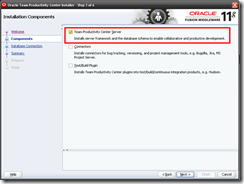
Select: Team Productivity Center Server
Choose: Next

Input Username: tpc
Input Password: *****
Choose: Test Connection
 Attention
Recognize the equal versions !
This information is current. our OTPC Repository is Version 11.1.2.1.38.60.81. We want only install the new Server Component.

Choose: Next
 Error
I get this error and the only option i can choose is
Canel.
Choose
Next show Step 3 again.


